Networking events move fast. You meet someone great, swap numbers, and three days later you cannot remember who was who. We have all been there.
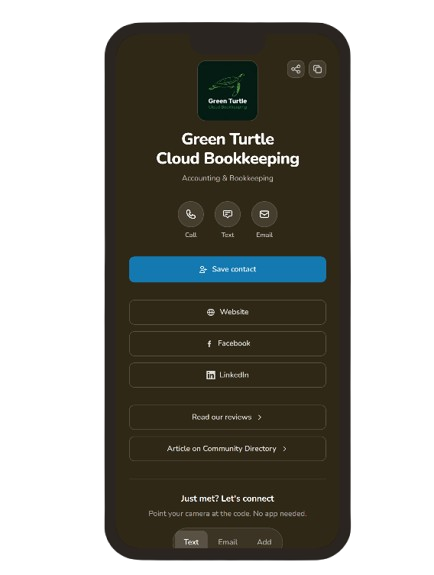
Every business on Fraser Made now gets a free digital business card. It is a page built for your phone that turns that moment into a real connection.
What your card includes
This is not a static PDF or a link to a generic profile. Your card brings together everything someone needs after meeting you:
- One-tap calling, texting, and emailing with your phone, email, and website in one place
- A downloadable QR code that links straight to your card. Grab the PNG and add it to printed materials, signage, or your social profiles.
- Your spotlight article from the directory, so people can read your story
- Your reviews, social profiles, and links all gathered together
- A one-tap “Save contact” button that adds your details straight to their phone
No website to navigate. No hunting through pages. Just your business, front and centre on a phone screen.
The networking moment: scan, send, connected
Every card has a “Just Met? Let’s Connect” section with a QR code. When someone scans it, they get a pre-filled message with your details and links ready to go. They tap send, and your info sits in their message history, your website is in their contacts, and your card is in their pocket.
The whole thing takes four steps:
- You show your phone or a printed QR code
- They scan it with their camera
- A message with your links pops up, already written
- They hit send
No typing. No “wait, how do you spell that?” No lost connections at the end of the night.
Switch the QR to Save contact mode and scanning it adds your name, number, email, and website directly to their phone’s contact list. One scan, done.
Switch the QR to Email or Text mode and scanning it opens a pre-filled message ready to send. Same idea. Scan, send, connected.
1-Min AI Video Explanation
I know… AI is everywhere nowadays. But this video explanation is not that bad…
Install it on your phone like an app
Your business card is a web app. You install it directly from the browser without any app store.
On Android (Chrome): Open your card in Chrome, tap the three dots in the top right, then tap “Install app.”
On iPhone (Safari): Open your card in Safari, tap the Share button at the bottom, then tap “Add to Home Screen.”
It sits on your home screen and opens full-screen, no browser bar in the way. Handy when you are at an event and need to pull it up fast. Google has a quick guide on installing web apps if you want device-specific steps.
Where your card lives
Your digital card is linked from your Fraser Made listing. When someone reads your story on the directory, they can jump straight to it from the contact details section.
Not yet public in the directory? Your card still works. Use it at networking events, on printed materials, or anywhere you want people to connect with you without building a website.
Print a QR code for your physical cards
Already have printed business cards? We generate a print-ready QR code that links to your card’s connect section. Stick it in the corner of your existing card. You get something tangible to hand over, plus a digital backup that does the rest.
Free for every business on Fraser Made
This is not a premium add-on. Every business on Fraser Made gets their digital business card at no cost.
We built this because networking is easier when everyone has the right tools. Not just the ones with big budgets or fancy websites. Every business owner who shows up, supports each other, and builds something together. That is who this is for.
A handshake and a conversation can turn into a lasting partnership, a referral, or a friendship. The card is a tool to make sure those moments do not slip away.
Already on Fraser Made? Your card is ready. Not yet featured? Apply to be featured. The card comes with it.